


Description
GitHub is a Git repository hosting service. It provides tools to manage artifacts on the Git repository. The GitHub plug-in imports Git artifacts based on queries for issues, commits, pull requests and GenAI Productivity Metrics.

GitHub is a Git repository hosting service. It provides tools to manage artifacts on the Git repository. The GitHub plug-in imports Git artifacts based on queries for issues, commits, pull requests and GenAI Productivity Metrics.


The GitHub plugin provides for integration with a GitHub server. This plugin imports issues, pull requests, and commit data from a GitHub server and saves them as HCL DevOps Velocity issues. Data between the GitHub server and the HCL DevOps Velocity server is synchronized every five minutes.
This plugin supports Cloud and On-Premises platform.
Beginning with HCL DevOps Velocity version 2.4.0 users must enter a user access key is required to connect with the HCL DevOps Velocity server. If you are upgrading from a previous version, you must obtain and add the key to the HCL DevOps Velocity User Access Key configuration property. If the user access key is not added, the integration fails.

To use the GitHub plugin, the plugin must be loaded and an instance created before you can configure the plugin integration. You define configuration properties in the user interface or in a JSON file.
The following table lists the compatibility versions of the GitHub plug-in and Velocity:
| DevOps Velocity version | GitHub plug-in version |
|---|---|
| 5.2.6 or later | 1.5.15 |
| 5.2.5 or 5.2.6 | 1.5.10 |
| 5.2.0 - 5.2.4 | 1.5.4 |
| 5.0.11 - 5.1.9 | 1.5.1 |
| 5.0.8 - 5.0.10 | 1.4.19 |
The GitHub plugin supports scheduled events integration which are listed in the following table:
| Name | Description |
|---|---|
| syncGithubIssuesEvent | Queries the GitHub repository for issues. |
| syncGithubCommitsEvent | Queries the GitHub repository for commits. |
| syncGithubPullRequestsEvent | Queries the GitHub repository for pull requests. |
| SyncGitHubCopilotMetrics | Queries the GitHub Copilot GenAI Productivity Metrics. |
To install the plug-in, perform the following steps:
There are two methods to integrate the plug-in:
The tables in the Configuration properties topic describe the properties used to define the integration.
To integrate the plug-in using the user interface, perform the following steps:
The JSON file contains the information for creating a value stream. Within the JSON file is a section for integrations. It is in this section that plugin properties can be defined. Refer to the JSON sample code in the Configuration Properties section.
To integrate the plug-in using a JSON, perform the following steps:
 icon, and then Select Edit value stream to modify the JSON file in the code or tree view editors.
The access token generated from GitHub server requires the Full control of private repositories permission to connect to the Github.

Wildcard functionality: A new way to specify multiple repositories in the GitHub plugin without having to manually modify the integration each time. Regular expressions would be most valuable and dynamic. Example: ucv-ext-*, repo-name*, *repo*-abc. to specify multiple repositories which containe the same pattern in their name.
Previously: Must list every plugin manually to be imported. Example: ucv-ext-jira, ucv-ext-appscan, ucv-ext-sonarqube
With this functionality : Single regex will import all repositories. Example: ucv-ext-*.
The GitHub integration automatically normalizes pull request activities into a chronological timeline of lifecycle events. Rather than relying solely on GitHub's static PR states (OPEN, CLOSED, and MERGED), the plug-in calculates a dynamic status for each PR based on its historical review and resolution activity.
When PR data is processed, the system builds an event history that transitions through the following statuses: OPEN, INREVIEW, REVIEWED, RESOLVED, MERGED / CLOSED.
The GitHub Copilot Metrics integration enables customers to automatically collect and analyze Copilot usage insights for their organization. This feature retrieves user activity, engagement levels, language-specific completions, and other Copilot adoption metrics directly from the GitHub API and syncs them into Velocity.
This helps organizations track how developers are using AI-assisted coding and measure productivity impact through structured metrics.
The GitHub Copilot Metrics integration fetches structured JSON data from the Copilot Metrics API and extracts multiple metric categories. Velocity processes the API response and converts it into five different metric datasets.
These fields come directly from the API response:
| Field | Description |
|---|---|
| date | The date of the metric record |
| Active | Users who interacted with Copilot |
| Engaged | Users who accepted or modified Copilot suggestion |
dataset: GenAI User Adoption
These fields come directly from the API response:
| Field | Description |
|---|---|
| date | The date of the metric record |
| suggested | Total lines Copilot suggested across all editors or languages |
| Accepted | Total lines accepted by the user |
dataset: GenAI Line Acceptance
These fields come directly from the API response:
| Field | Description |
|---|---|
| date | The date of the metric record |
| suggestions | Number of code suggestions generated by Copilot |
| acceptances | Number of suggestions accepted |
dataset: GenAI Code Acceptance
These fields come directly from the API response:
| Field | Description |
|---|---|
| date | The date of the metric record |
| Total Chats | Total chat prompts created by users |
| Chat Insertion Events | Chat-to-code insertion actions |
| Chat Copy Events | Chat response copy events |
dataset: GenAI Chat Events
These fields come directly from the API response:
| Field | Description |
|---|---|
| date | The date of the metric record |
| pr_summaries_created | Number of PR summaries generated by Copilot |
dataset: GenAI PR Events
{
  "date": "2025-06-11",
  "total_active_users": 40,
  "total_engaged_users": 20,
  "copilot_ide_code_completions": {
	"total_engaged_users": 20,
	"languages": [
  	{ "name": "python", "total_engaged_users": 10 },
  	{ "name": "ruby", "total_engaged_users": 5 },
  	{ "name": "javascript", "total_engaged_users": 5 }
	]
  }
}
Velocity collects and stores this data for reporting and trend analysis.
To use the GitHub Copilot Metrics integration, the following requirements must be met:
1. GitHub Organization Administrator Access
You must have organization-level admin access to enable and configure Copilot API usage.
2. Copilot API Access Approval
Your organization must request and obtain Copilot API access from GitHub. Without this approval, Copilot metrics cannot be collected.
3. Required Tokens
Personal Access Tokens must include Copilot Admin permissions. Tokens without these scopes will fail.
4. IT / Security Team Approval
Copilot Admin API permissions typically require approval from your IT or Security teams.
Enable Collect Copilot Metrics in Add Integration
After Enabled, you need to fill the following details:
The following Copilot metrics can be added and displayed within the Velocity insights section:
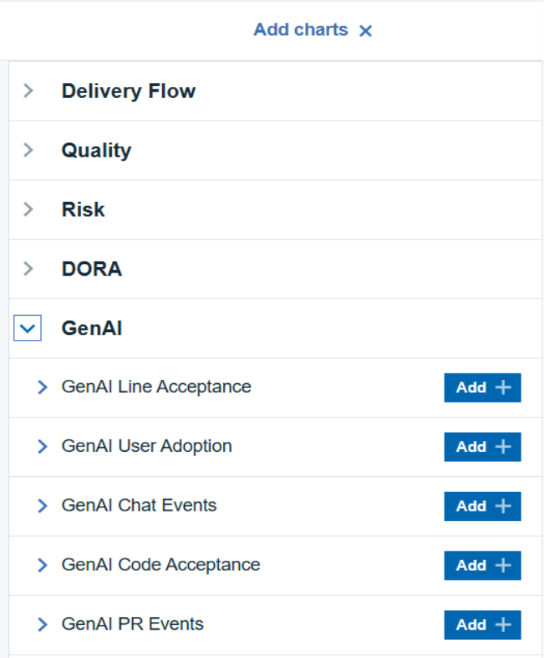
This feature is provided as a Tech Preview. Organizations intending to enable this feature, must obtain GitHub Copilot API access approvals and generate tokens with the required Copilot permissions. Without these approvals and the appropriate tokens, Copilot metrics cannot be collected.
The following tables describe the properties used to configure the integration. Each table contains the field name when using the user interface and the property name when using a JSON file.
Some properties might not be displayed in the user interface, to see all properties enable the Show Hidden Properties field.
| Name | Description | Required | Property Name |
|---|---|---|---|
| NA | The version of the plugin that you want to use. To view available versions, click the Version History tab. If a value is not specified, the latest version is used. | No | image |
| Integration Name | An assigned name to the value stream. | Yes | name |
| Logging Level | The level of Log4j messages to display in the log file. Valid values are: all, debug, info, warn, error, fatal, off, and trace. | No | loggingLevel |
| NA | List of configuration properties used to connect and communicate with the GitHub server. Enclose the properties within braces. | Yes | properties |
| The name of the tenant. | Yes | tenant_id | |
| NA | Unique identifier assigned to the plugin. The value for the GitHub plugin is ucv-ext-github |
Yes | type |
| HCL DevOps Velocity User Access Key | An auto-generated user access key provides credentials for communicating with the HCL DevOps Velocity server. | Yes | NA |
| Name | Type | Description | Required |
|---|---|---|---|
| API URL | String | The URL to the REST API v3 for the GitHub instance. | Yes |
| Owner | String | The owner name of the GitHub repository. | Yes |
| Repositories | Array | Comma separated list of Github Repository names (separated by comma). Regular expression is enabled (Example: ucv-ext-*, repo-name*, *repo*-abc) | Yes |
| branch | String | GitHub repositories branch, The branch to pull commits from. | No |
| Token | Secure | The token to use to authenticate with the GitHub repository. | No |
| Additional branches | Array | Comma separated additional branches to collect commits from besides the main one, leave blank if not needed. | No |
| Proxy Server | String | The URL of the proxy server including the port number. | No |
| Proxy User Name | String | The user name used to authenticate with the proxy server. | No |
| Proxy Password | Secure | The password used to authenticate with the proxy server. | No |
| Team Space Id | FilterableSelect | The Team space associated with the integration. | No |
| Team Id | FilterableSelect | The teams associated with the integration. | No |
The following sample code can be used as a template to define the integration within the JSON file for a value stream. Copy and paste the template into the JSON file Integration section and make the appropriate changes.
 "integrations":[
   {
      "type":"ucv-ext-github",
      "tenant_id":"tenant-id",
      "name":"github-integration-name",
      "properties":{
         "owner":"owner-name",
         "repositories":[
            "repo1",
            "repo2",
            "repo3"
         ],
         "apiUrl":"github-api-url",
         "token":"generated-token",
         "ucvAccessKey":"generated-access-key",
         "proxyServer": "proxy_server_url",
         "proxyUsername": "proxy_server_user_name",
         "proxyPassword": "proxy_server_password"
      }
   }
]
Altering the ‘repositories’ field in the settings will not automatically eliminate any pre-existing data from older integrations. If your goal is to solely display information related to the newly updated repository, it’s necessary to first remove the old integration. After that, you can create a new integration that includes the updated list of repositories.
Uploaded: 26-August-2026 14:01
docker pull hclcr.io/accelerate/ucv-ext-github:1.5.15
Enhancement: Enhances Pull Request tracking by calculating dynamic lifecycle statuses (OPEN, INREVIEW, REVIEWED, RESOLVED, MERGED/CLOSED) based on real-time review activity for accurate Value Stream Map (VSM) visibility.
Uploaded: 9-June-2026 18:51
Uploaded: 28-November-2025 and 11:40
docker pull hclcr.io/accelerate/ucv-ext-github:1.5.4
Uploaded: 26-Dec-2024 02:00
docker pull hclcr.io/accelerate/ucv-ext-github:1.5.1
Uploaded: 09-Sep-2024 08:35
docker pull hclcr.io/accelerate/ucv-ext-github:1.4.19
Uploaded: 25-Jul-2024 05:44
docker pull hclcr.io/accelerate/ucv-ext-github:1.4.17
Uploaded: 15-Nov-2023 12:15
docker pull hclcr.io/accelerate/ucv-ext-github:1.4.16
Uploaded: 08-Sep-2023 12:45
docker pull hclcr.io/accelerate/ucv-ext-github:1.4.7
Uploaded: 05-Jun-2023 08:31
docker pull hclcr.io/accelerate/ucv-ext-github:1.4.5
Uploaded: 09-May-2023 19:05
docker pull hclcr.io/accelerate/ucv-ext-github:1.3.46
Uploaded: 26-Oct-2022 06:38
docker pull hclcr.io/accelerate/ucv-ext-github:1.3.35
Uploaded: 25-Oct-2022 16:42
docker pull hclcr.io/accelerate/ucv-ext-github:1.3.34
Uploaded: 31-May-2022 07:19
docker pull hclcr.io/accelerate/ucv-ext-github:1.3.31
Uploaded: 22-Apr-2022 11:38
docker pull hclcr.io/accelerate/ucv-ext-github:1.3.29
Uploaded: 28-Feb-2022 16:38
docker pull hclcr.io/accelerate/ucv-ext-github:1.2.25
Uploaded: 28-Jan-2022 15:02
docker pull hclcr.io/accelerate/ucv-ext-github:1.2.24
Uploaded: 03-Dec-2021 06:23
docker pull hclcr.io/accelerate/ucv-ext-github:1.1.22
Uploaded: 19-Aug-2021 12:38
docker pull hclcr.io/accelerate/ucv-ext-github:1.1.20
Uploaded: 11-Aug-2021 07:01
docker pull hclcr.io/accelerate/ucv-ext-github:1.1.18
Uploaded: 23-Jul-2021 12:13
docker pull hclcr.io/accelerate/ucv-ext-github:1.1.15
Uploaded: 14-Jul-2021 11:19
Uploaded: 22-Jun-2021 11:38
Uploaded: 10-May-2021 08:23
Uploaded: 16-Mar-2021 06:21
Uploaded: 08-Feb-2021 07:34
 Summary
 Usage
Usage
 Pull Request Lifecycle Events
 GenAI Productivity Metrics
 Configuration Properties
