Security Without the Detour: Meet the HCL AppScan Plugin for Eclipse

Visualise a scenario when you, as a software developer, are in the zone—debugging, building, solving problems—when a software security alert pulls you out of your flow. Abruptly, you are logging into a separate security portal, navigating dashboards, filtering applications, reviewing security scan results, copying file paths, jumping back to your IDE to locate the code, applying a fix, then returning to the portal again to update statuses, and then downloading security reports.
Your focus fragments. Your momentum stalls. Security shouldn’t feel like a detour from development. It should be part of it.
That’s exactly the problem the HCL AppScan Plugin for Eclipse is designed to eliminate.
By integrating directly with our platforms - HCL AppScan on Cloud (ASoC) (application security on cloud) and HCL AppScan 360º (on-prem application security), the plugin brings your entire security workflow into one of the widely used IDEs, Eclipse, right where development happens.
With a Single Login Inside the Eclipse, You Can Enable:
Seamless Application Integration
Select your application in ASoC or AppScan 360º and pull the latest SAST and SCA findings.

Precision Code Navigation
Click a vulnerability to jump straight to the exact line of code.
In-Editor Remediation Intelligence
Access detailed issue details and remediation assistance right in your editor.
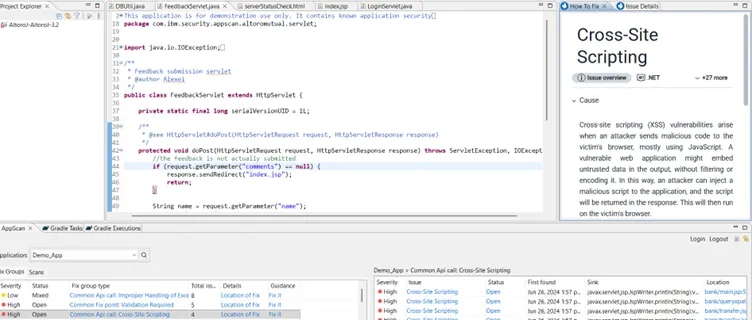
Real-Time Status Synchronization
Update statuses (Open, In Progress, Fixed or Noise, etc) and sync them instantly with the AppScan backend.
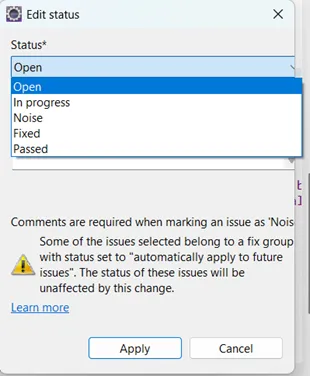
Integrated Compliance Reporting
Generate compliance-ready reports (PDF, CSV, HTML or XML) without leaving your session. You can view the sample reports here.
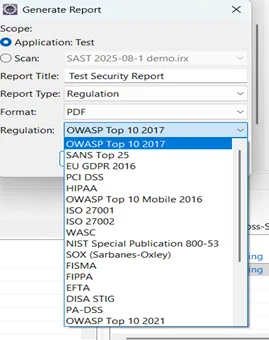
Dynamic Data Refresh
Instantly update the displayed issues by using the Refresh button, which reflects any status changes in ASoC or AppScan 360º.
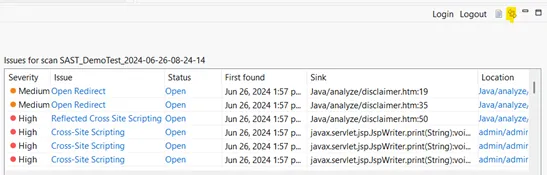
No browser hopping. No duplicate updates. No lost productivity. Security becomes part of your development flow, not a separate task to manage later.
The result? Faster remediation, smoother collaboration between development and security teams, simplified compliance reporting, and true Shift-Left security in action.
Parallel Power: Team-Wide Remediation
One of the plugin’s greatest advantages is its ability to enable parallel remediation. Multiple developers can log in to ASoC or AppScan 360º simultaneously from their respective Eclipse IDEs, each focusing on vulnerabilities in their respective modules.
They can mark findings as “In Progress” or "Fixed" or "Noise". The updates synchronize with ASoC or AppScan 360º in real time. This eliminates duplicate efforts, improves accountability, and ensures your security and compliance teams always have an up-to-date view of progress, without a single status meeting or manual tracking sheet.
Why Integrate with HCL AppScan?
Benefit from HCL AppScan’s proven AI/machine learning capabilities, like Intelligent Finding Analytics (IFA) for reducing false positives, and Intelligent Code Analytics (ICA) for automatically widening scan coverage
Get Started Today
- Refer to this page for System Requirements and Getting Started.
- See full list of all the marketplace-based collaborations with high-demand tools like Visual Studio, Jenkins, GitHub, GitLab, and more.
- Get more information on all HCL AppScan application security testing solutions here.
Interested in exploring HCL AppScan on Cloud or AppScan 360º? Click here for a free trial of HCL AppScan on Cloud to use with the above Eclipse plugin, or contact us to start your own HCL AppScan 360º journey today!
Code securely, confidently, and efficiently—without ever leaving your flow.

Start a Conversation with Us
We’re here to help you find the right solutions and support you in achieving your business goals.