
How to Automate the 2026 Secure Boot Certificate Update with HCL BigFix

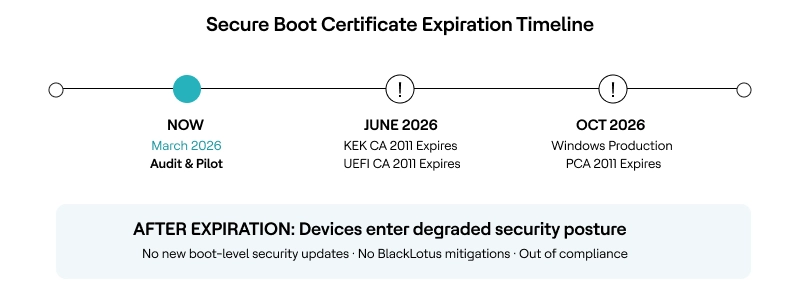
The Microsoft Secure Boot certificates that have protected the Windows boot process since 2011 begin expiring in June 2026. Microsoft has described this as one of the largest coordinated security maintenance efforts across the Windows ecosystem, spanning firmware updates and millions of unique device configurations worldwide.
Three foundational certificate authorities (KEK CA 2011, UEFI CA 2011, and Windows Production PCA 2011) must be replaced with their 2023 successors before the deadline. Organizations that miss this window will not see devices fail to boot—but those devices will enter a degraded security posture: unable to receive new boot-level security updates, unable to apply mitigations against threats like the BlackLotus UEFI bootkit (CVE-2023-24932), and out of compliance with modern security mandates.
For enterprises managing thousands of endpoints across diverse hardware, HCL BigFix provides dedicated Fixlets and real-time inventory analysis to automate this Secure Boot certificate update at scale—including Windows Server systems that do not receive the update automatically.
What Happens When These Certificates Expire?
There is a critical misconception circulating in some enterprise communications: That non-compliant devices will fail to boot after June 2026. This is not accurate.
According to Microsoft’s official guidance (KB 5062713), devices that have not received the 2023 certificates will continue to start normally, and standard Windows updates will continue to install.
The actual risk is more insidious.
After the certificates expire, affected devices lose the ability to receive security updates for the Windows Boot Manager, Secure Boot databases, revocation lists and mitigations for newly discovered boot-level vulnerabilities. Over time, this limits protection against emerging threats and affects scenarios that rely on Secure Boot trust, such as BitLocker hardening and third-party bootloader validation.
This is critical because boot-level threats are real and active. The BlackLotus UEFI bootkit, first discovered in 2023, was the first malware capable of bypassing Secure Boot on fully updated Windows 11 systems by exploiting CVE-2022-21894 and CVE-2023-24932.
Microsoft has explicitly stated that the 2023 replacement certificates are the latest security measure to address this class of vulnerability. Leaving devices on expired certificates means leaving the door open to exactly the kind of attack Secure Boot was designed to prevent.
Why Is the Secure Boot Certificate Update So Hard to Manage at Scale?
It is not a standard software patch. The certificates live in the UEFI firmware’s non-volatile storage, and the update process involves configuring a registry key, a scheduled task that runs every 12 hours, one or more reboots, and, in some cases, a prerequisite OEM firmware update before the certificates can even be applied.
Several factors make enterprise-scale deployment particularly challenging:
- Windows Server requires manual action. Unlike Windows PCs, which receive the 2023 certificates through Microsoft’s Controlled Feature Rollout (CFR) as part of monthly updates, Windows Server does not receive them automatically. IT administrators must manually initiate the certificate update on every applicable server and Generation 2 Hyper-V VM.
For organizations running hundreds or thousands of servers, this is a significant operational burden without automation. - OEM firmware compatibility is a prerequisite. On some devices—particularly older hardware—the certificate update will fail unless a firmware update from the device manufacturer is applied first. When Windows attempts the handoff and the firmware rejects it, Event ID 1795 is logged and the update stalls.
Identifying which devices in a fleet need firmware attention before the certificate deployment can begin requires deep hardware inventory data. - Mixed deployment methods cause failures. Microsoft’s own guidance warns against mixing deployment methods (registry keys, Group Policy, Intune CSP) on the same device. Enterprises using a patchwork of tools risk inconsistent states and devices stuck in “In Progress” indefinitely.
- Disconnected environments are invisible to cloud tools. Organizations with air-gapped networks, OT environments or point-of-sale kiosks cannot rely on Intune or Windows Update to deliver the certificates. These devices need a management tool that operates independently of cloud connectivity.
How HCL BigFix Automates the Secure Boot Certificate Update
Secure boot certificate update is exactly the kind of complex, fleet-wide infrastructure challenge that HCL BigFix’s architecture was built for. In fact, HCL BigFix is the first to release a dedicated, production-ready content for the Secure Boot certificate transition. As of March 2026, no other endpoint management vendor has done that.
While the rest of the market is still in wait-and-see mode, leaving IT teams to cobble together custom PowerShell scripts and manual registry edits, HCL BigFix has already shipped native, click-and-deploy content in the Patches for Windows site (version 4680, published March 3, 2026).
What would otherwise require custom scripting and manual registry configuration across every device becomes a single Fixlet deployment from the HCL BigFix console. The solution covers both fleet assessment and automated remediation through two purpose-built components:
Fleet-wide Inventory: Analysis ID 660
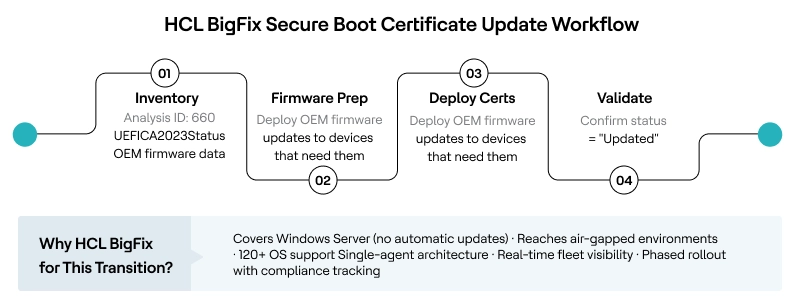
Before deploying any firmware-level changes, you need to know exactly where your fleet stands. HCL BigFix Analysis 660 (Microsoft Windows Secure Boot Inventory Data) provides real-time telemetry across every managed endpoint. It retrieves the UEFICA2023Status registry value (NotStarted, InProgress, or Updated), error codes from the UEFICA2023Error key, Secure Boot enablement status, and OEM-specific firmware details.
This gives IT teams a single dashboard view of which devices are ready, which need OEM firmware updates first, and which have already completed the transition—eliminating the blind-spot problem that makes manual audits so risky.
Automated Certificate Deployment: Fixlet 506820201
Once the fleet is mapped, HCL BigFix Fixlet 506820201 (KB5068202) automates the registry configuration required to trigger the certificate update. It sets the AvailableUpdates registry key to 0x5944, which signals Windows to deploy all relevant 2023 certificates (KEK, DB, and the updated boot manager) during the next scheduled task cycle. The Fixlet includes two actions, both of which require a reboot to complete the firmware-level update.
After the reboot, the UEFICA2023Status tracked by Analysis 660 should transition to “Updated,” giving IT teams a clear, auditable confirmation of success.
HCL BigFix vs. Manual Deployment
|
Capability |
Manual / GPO / Intune |
HCL BigFix |
|
Fleet inventory of Secure Boot status |
PowerShell scripts per device or Intune reporting (limited to enrolled devices) |
Analysis 660: real-time UEFICA2023Status across all managed endpoints |
|
Windows Server coverage |
Manual registry or GPO-no automatic rollout |
Same Fixlet covers clients and servers from one console |
|
OEM firmware gap detection |
Manual audit by hardware model |
Analysis 660 retrieves OEM firmware version data automatically |
|
Air-gapped/disconnected endpoints |
Not reachable by Intune or Windows Update |
HCL BigFix agent operates autonomously without cloud connectivity |
|
Phased rollout with targeting |
Requires manual ring management |
Target by hardware model, OS version, business unit, or compliance state |
|
Post-deployment validation |
Check UEFICA2023Status via script per device |
Continuous compliance monitoring via the Analysis 660 dashboard |
Recommended Deployment Framework
Phase 1 — Readiness audit (Week 1–2): Deploy Analysis 660 across the entire fleet. Identify devices where UEFICA2023Status is “NotStarted.” Cross-reference OEM firmware data to flag devices that need manufacturer firmware updates before the certificate deployment can proceed. Prioritize Windows Server systems, since they will not receive the update automatically.
Phase 2 — Pilot testing (Week 2–3): Deploy Fixlet 506820201 to a carefully selected pilot group representing diverse hardware profiles (Dell, HP, Lenovo, VMware VMs, Hyper-V Gen2 VMs). Validate that UEFICA2023Status transitions to “Updated” after reboot. Monitor Event Viewer for Event ID 1795 (firmware handoff errors) and Event ID 1800 (reboot required). Document any OEM-specific issues.
Phase 3 — Staged enterprise rollout (Week 3–8): Roll out in waves by business unit, hardware model, or criticality. Use HCL BigFix targeting to exclude devices that have not yet received prerequisite firmware updates. Track compliance continuously via Analysis 660, and escalate any devices stuck in the “In Progress” state for investigation.
Phase 4 — Validation and reporting (Ongoing): Confirm 100% fleet coverage before the June 2026 deadline. Generate compliance reports for audit and regulatory purposes. Maintain the analysis as a continuous monitor to catch new devices entering the environment without the 2023 certificates.
Conclusion
The Microsoft Secure Boot certificate update in 2026 is not a standard patch cycle-it is a firmware-level trust migration that affects every Windows device manufactured since 2012, and it is the most operationally complex security maintenance event most IT teams will face this year. The real risk is not devices failing to boot, but a silent erosion of boot-level security that leaves enterprises exposed to threats like BlackLotus and out of compliance with modern security standards.
HCL BigFix has shipped dedicated content for this transition. HCL BigFix’s Analysis 660 and Fixlet 506820201 are live and production-ready today. This is a direct reflection of HCL BigFix’s broader architectural strengths: A single autonomous agent, real-time fleet visibility across 120+ operating systems, native operation in air-gapped and disconnected environments and the industry’s deepest content library.
The Secure Boot certificate transition is a showcase for exactly the kind of enterprise-scale automation and continuous compliance that HCL BigFix was designed to deliver.
With the first certificates expiring on June 27, 2026, the window for pilot testing and phased rollout is closing. Start with an inventory audit this week.
Ready to assess your Secure Boot readiness? Request a personalized HCL BigFix technical walkthrough to see Analysis 660 and Fixlet 506820201 in your environment.
Technical evaluators: See HCL BigFix Secure Boot lifecycle tools in action — request a demo.
Business decision-makers: Talk to our team about automating your 2026 Secure Boot transition at scale.
Frequently Asked Questions
1. When exactly do Microsoft Secure Boot certificates expire?
The Microsoft Corporation KEK CA 2011 and UEFI CA 2011 begin expiring in June 2026. The Microsoft Windows Production PCA 2011, which signs the Windows bootloader itself, expires in October 2026. Organizations should complete the transition well before June to allow time for pilot testing and phased rollout.
2. Will my devices stop booting after the certificates expire?
No. Microsoft has confirmed that devices without the updated certificates will continue to start and operate normally. However, they will enter a degraded security posture: unable to receive new Secure Boot security updates, boot manager fixes, or mitigations for boot-level vulnerabilities like CVE-2023-24932 (BlackLotus).
3. Does Windows Server automatically receive the Secure Boot certificate update?
No. Unlike Windows client PCs, Windows Server does not receive the 2023 certificates through Controlled Feature Rollout. IT administrators must manually initiate the update via registry keys, Group Policy, or an endpoint management tool like HCL BigFix. This makes automated deployment particularly valuable for server-heavy environments.
4. What does HCL BigFix’s Fixlet 506820201 actually do?
The Fixlet automates the registry configuration that triggers the certificate deployment process. Specifically, it sets the AvailableUpdates registry key (under HKLM\SYSTEM\CurrentControlSet\Control\SecureBoot) to 0x5944, which signals Windows to deploy all 2023 certificates and the updated boot manager. A reboot is required to complete the firmware-level update.
5. What if a device fails the certificate update?
If Windows encounters an error during the firmware handoff, it logs Event ID 1795 in the System event log. This typically indicates that the device needs an OEM firmware update before the certificates can be applied. BigFix Analysis 660 surfaces OEM firmware data, enabling IT teams to identify and proactively address these devices rather than discovering failures after deployment.
6. Can HCL BigFix handle this update for air-gapped environments?
Yes, the HCL BigFix agent operates autonomously without requiring cloud connectivity. This makes it the preferred tool for air-gapped networks, OT environments, and disconnected endpoints such as point-of-sale kiosks or ATMs, where cloud-dependent management tools cannot reach.
References and Resources
- Support for Microsoft Windows Secure Boot Certificate Updates
- KB0129014 — BigFix Support for Windows Secure Boot Certificate Updates
- Secure Boot Certificate Updates: Guidance for IT Professionals (KB 5062713)
- Secure Boot Playbook for Certificates Expiring in 2026
- Act Now: Secure Boot Certificates Expire in June 2026
- Windows Server Secure Boot Playbook for Certificates Expiring in 2026


Start a Conversation with Us
We’re here to help you find the right solutions and support you in achieving your business goals.