



Introducing DevOps Deploy 8.2.0: AI MCP Server, Mainframe Linked Versions, RHEL 10 Support & More

Overview
Our application-release solution, HCL DevOps Deploy, has a new version available, 8.2.0. DevOps Deploy infuses automation into modern CI/CD pipelines, strengthening the continuous delivery and continuous deployment process and provides robust visibility, traceability and auditing capabilities.
Our latest release features our first AI-based Model Context Protocol (MCP) Server, accompanied by tools accessible through chat prompts in your IDE, serving as an AI agent. The AI agent interprets your chat prompts to intelligently select and run the appropriate MCP tool to fulfill the request.
The following MCP tools are available from your MCP client:
|
Tools |
Description |
Input Requirement |
|
list_applications |
Lists all applications. |
None |
|
list_application_processes |
Lists all processes defined for an application. |
application ID or application name |
|
list_application_environments |
Lists all environments defined in an application. |
application ID or application name |
|
list_application_snapshots |
Lists all snapshots defined in an application. |
application ID or application name |
|
get_deployment_status |
Returns the application deployment status. |
deployment_request_id (optional) |
|
deploy_snapshot_to_environment |
Deploys an application snapshot to an environment. |
application_id, snapshot_id, process_id, environment_id |
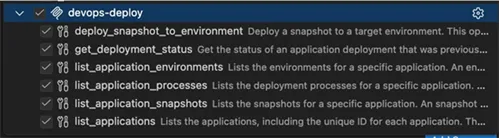
Your IDE can show you the tools available for the MCP server, as shown in this VS Code example:
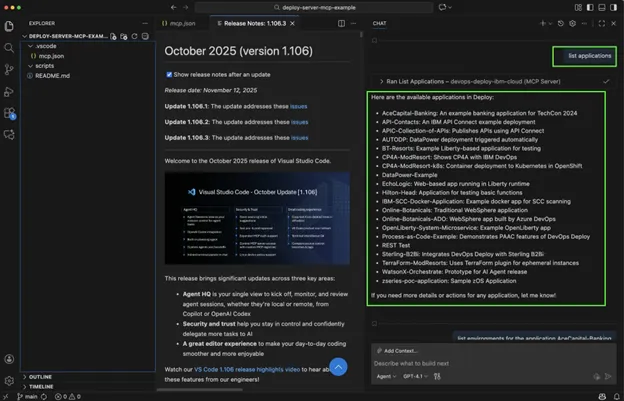
The MCP Agent in your IDE can then query the tools above and return information from the DevOps Deploy Server. Here are a couple of examples from the VS Code at the 1.106.3 release:
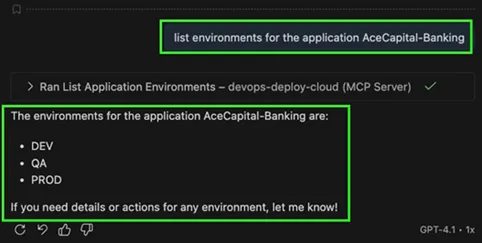
Here is one more where we query the target environments for one of our applications in DevOps Deploy:
The idea is to bring automation responsible for significantly reducing manual work, simplifying integration across different systems, and enabling powerful automation for application deployments. For example, a prompt could say, “Deploy snapshot Dec25-01 to the QA environment for the application Ace-Capital-Banking,” and the MCP tools utilize power automation, resulting in quicker and easier deployment cycles.
This AI-powered MCP Server enhances enterprise CI/CD automation by enabling faster, more intelligent deployment execution across hybrid and mainframe environments.
We have also introduced other exciting new enhancements in DevOps Deploy 8.2.0. In the next section, we review each new feature available to our customers.
Enhancements in DevOps Deploy 8.2.0
Version 8.2.0 includes the following enhancements:
|
Feature Title |
Description |
|
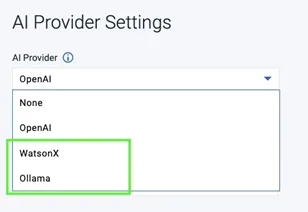
Added Ollama and WatsonX support for the AI-based Deployment Genie |
Perform an AI analysis on failed deployment steps using the Deployment Genie button with integrations to Ollama or WatsonX as your LLM of choice. When you click the button, the deployment log is sent to a configured AI service for analysis.
|
|
New Deploy MCP Server |
The MCP Server allows AI agents to interact with the Deploy server and perform various deployment actions using chat prompts. This feature significantly reduces manual work, simplifies integration across different systems, and enables powerful automation for application deployments in quicker and easier cycles. |
|
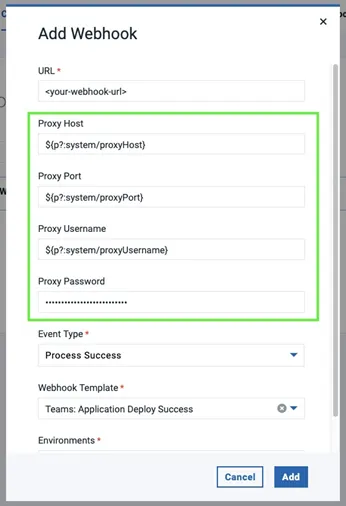
Added authentication support for proxy-enabled webhook integrations with MS Teams |
Added authentication support for the proxy-enabled webhook integration with MS Teams notifications.
|
|
Added support for RedHat Enterprise Linux 10 |
We have added support for RHEL 10 for the DevOps Deploy Server, Deploy Agent, and Agent Relay in the 8.2.0 release.
|
|
Enhanced environment inventory status |
A new environment inventory status diagnoses inventory differences caused by a failed component uninstall process. |
|
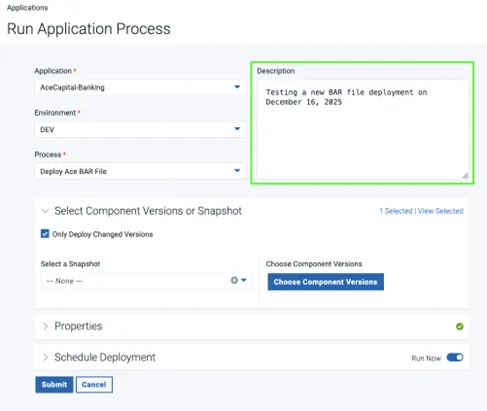
Added the Description parameter to the Run Application Process window |
An optional description parameter has been added to the Run Application Process window to populate the description of the process while reviewing the deployment process request.
|
|
Added support for Java 25 |
This release supports Java 25. |
|
API updates |
The following API updates were introduced with DevOps Deploy 8.2.0: |
|
Added security updates |
Updated Apache Tomcat to 9.0.111 |
|
Container updates |
For those looking to make the journey to containerization, where the DevOps Deploy Server is installed in an OpenShift or Kubernetes cluster, the following updates were made to support our container deployments: |

Mainframe Enhancements
With the DevOps Deploy 8.2.0 release, we also provided the following new enhancements to help our zOS customers:
|
Feature Title |
Description |
|
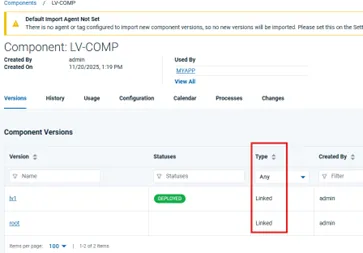
Enhanced z/OS component version feature |
You can now link z/OS component versions in HCL DevOps Deploy. You can deploy an application as a whole, allowing environments to reliably represent a specific version of the application, while maintaining the efficiency of incremental deployments.
|
|
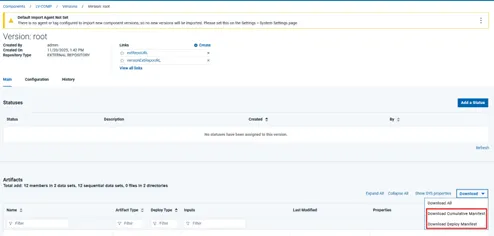
Added ability to download a manifest of artifacts of a Linked z/OS component version |
Added a button to download a manifest of artifacts of a Linked z/OS component version.
|

Start a Conversation with Us
We’re here to help you find the right solutions and support you in achieving your business goals.
