Rightsizing in Multi-Cloud FinOps: Best Practices Across AWS, Azure, and GCP

Why Rightsizing Matters More Than Ever
If you’re a large enterprise with high-volume cloud spending and are continuously running workloads in the cloud today, there’s a good chance you’re not just tied to a single provider.
Like most enterprises, you’re probably spread across AWS, Azure, and Google Cloud (GCP). Multicloud gives you flexibility, resilience, and freedom of choice — but it also makes cloud cost optimization a whole lot trickier. Organizations now rely on FinOps platforms to manage cloud costs across multiple cloud providers, ensuring cost efficiency and accountability in complex cloud environments.
The complexity of the cloud makes cost optimization essential and rightsizing is a solid step in that direction. Many of you may already be familiar with rightsizing, but for those who aren’t, here’s a quick recap of what it really means.
What is Rightsizing?
At its core, rightsizing means making sure your cloud resources match the needs of your workloads. It’s not about cutting corners or blindly slashing costs.
It’s about balancing performance and spend so your apps run smoothly without paying for unused capacity. When done well, rightsizing helps you:
- Eliminate waste: By resizing or reconfiguring instances, storage, and services to fit real demand, you can stop spending money on idle capacity.
- Improve efficiency: The right size means better utilization, which translates directly into leaner, smarter cloud spending.
- Keep apps performing without overspending: Your workloads get exactly what they need — no more, no less.
Rightsizing also leads to cost saving by identifying and eliminating unused resources, which directly optimizes costs and improves cost efficiency.
According to a poll by Gartner, 54% of participants state they are already utilizing rightsizing, while 46% are still not utilizing this lever to optimize their costs.
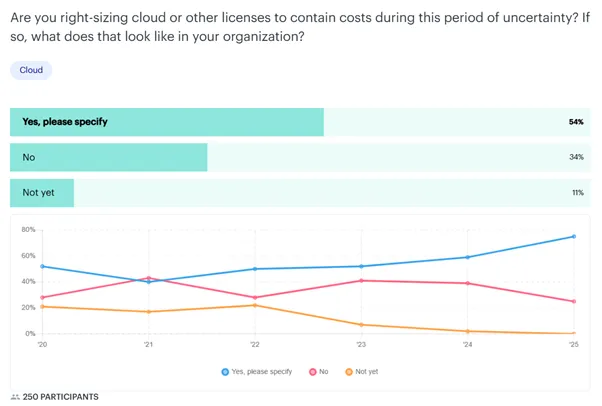
Image 1: Gartner poll on cloud rightsizing licensing
Rightsizing Across AWS, Azure, and GCP
The FinOps Foundation points out that AWS, Azure, and Google Cloud (GCP) all provide native tools for rightsizing. But each does it differently and that’s the challenge. So if you’re multicloud, you’re not just managing rightsizing — you’re juggling three playbooks.
Multicloud really is the new normal. A 2024 Gartner report found that 90% of organizations will adopt hybrid cloud through 2027, a sharp increase from just a few years ago. At the same time, cloud spending continues to climb. With so much at stake, the way you approach rightsizing across providers can have a massive impact.
Let’s look at how each cloud approaches it:
Cloud Rightsizing Feature Comparison Across Providers
|
Feature |
AWS |
Azure |
GCP |
|
Main rightsizing tool |
Compute Optimizer |
Azure Advisor |
Active Assist |
|
Auto scaling / Scale sets |
Auto scaling |
VM scale sets |
Managed instance groups |
|
Commitment model |
RI & Savings plan |
Reservations |
Committed use discounts |
|
Native multi-project visibility |
Limited |
Limited |
Limited |
|
Analyst/Study quote |
Most mature ecosystem |
Manual intervention needed |
Automatic discounts, better for variable workloads |
Table 1: Cloud rightsizing features comparison across AWS, Azure, GCP
AWS: Compute Optimizer and Trusted Advisor
- AWS Compute Optimizer applies machine learning to historical data (CPU, memory, etc.) to recommend better-fit EC2 instances, EBS volumes, and even Lambda configurations.
- Trusted Advisor flags idle or underutilized resources.
- Cost Explorer and Cost and Usage Reports (CUR) provide the granular data to track trends. AWS Cost Explorer is a key cost management tool for managing costs and performing cost analysis, giving you detailed visibility into your cloud spending.
Key consideration: AWS leans heavily on Reserved Instances (RIs) and Savings Plans. That makes rightsizing critical before you commit — otherwise, you’re locked into paying for oversized resources.
Azure: Advisor and VM Scale Sets
- Azure Advisor reviews usage across VMs, databases, and App Service plans to highlight rightsizing opportunities.
- Virtual Machine Scale Sets (VMSS) let you automatically scale VMs up and down based on demand. Load balancing and automated actions within VMSS help optimize costs and improve operational efficiency by distributing workloads and adjusting resources dynamically.
- Azure Reservations offer savings like AWS RIs — but again, they require careful rightsizing first.
Note: While Azure’s recommendations are valuable, they aren’t automated — you’ll still need to implement changes manually in complex setups.
GCP: Active Assist and Managed Instance Groups
- Active Assist’s Recommender uses AI to suggest rightsizing actions and highlight idle resources.
- Managed Instance Groups (MIGs) handle automatic scaling based on utilization.
- Committed Use Discounts (CUDs) are applied automatically to eligible workloads — unlike AWS and Azure, which require manual purchasing.Intelligent automation and anomaly detection in GCP help identify cost anomalies and cost saving opportunities, ensuring resources are optimized and costs are controlled.
What Is AI-powered Rightsizing and Why Should You Care?
Traditional rightsizing takes a lot of manual effort.
In a manual scenario, someone has to
Analyze usage data > Spot inefficiencies > Push changes — which makes it reactive, slow, and often inconsistent.
AI-powered rightsizing simply flips that on its head. By applying machine learning, it turns rightsizing into a proactive, continuous discipline. Instead of waiting for a quarterly review, AI constantly monitors and predicts.
Here’s why it matters for you:
- AI can handle scale: Dealing with bulk load of data is not a horror story anymore. AI can analyze CPU, memory, storage, network metrics to surface the best-fit recommendations.
- AI predicts, not just reports: It easily starts by spotting historical patterns and seasonality and helps you plan for needs you have yet to see.
- A little far-fetched, but AI takes action: In the near future, businesses should prepare for not just AI but AI agents that don’t just recommend changes — they can automatically rightsize workloads. In the current scenario, the HCL MyXalytics team of practitioners gives recommendations to allow your FinOps team to quickly implement these changes.
Who’s Involved in Making Rightsizing Work?
Rightsizing isn’t just a set it and forget it technical task.
It’s a team effort — which is why it’s such a core FinOps principle and has to be an ongoing job.
- FinOps practitioners lead the charge. They set up the process, crunch the numbers, and share recommendations.
- Engineers and application owners bring critical context. They know their workloads best and decide if a recommendation makes sense for performance.
- Technical Elements like monitoring CPU, memory, network, and disk usage, plus the right tooling, keep the insights flowing.
The Core Principles of Rightsizing
Think of rightsizing as more than just a cost-cutting trick. It’s really about performance optimization — ensuring your applications always have the resources they need. Not too little, not too much.
Here are the core principles you’ll want to keep in mind:
- It’s about hitting it right and not scaling down
Don’t think of rightsizing as just cutting down resources. Sometimes you’ll need to scale up to prevent performance bottlenecks. The real goal is to hit the right size, whether bigger or smaller. - Finding the right balance bewteen performance and cost
Overcutting leads to slow apps and frustrated users. Overprovisioning wastes money. Rightsizing is about finding that balance between experience and efficiency. - Relying on the power of data, facts not feel
Look at hard metrics like CPU, memory, storage, and network utilization. Study the spikes, seasonality, and patterns over time. That’s your north star, not guesswork. And if you put AI in the mix, your life just gets a whole lot easier. - Get more using historical and predictive insights
What has happened in the past might repeat itself. Past data helps you see what’s consistently underutilized. AI-powered predictive analytics takes it further by spotting upcoming growth, seasonal peaks, or unexpected surges. - The absolute must is making it continuous
Cloud usage evolves fast as your business needs change and there is no stopping that — new services, shifting business priorities, scaling workloads. That’s why rightsizing shouldn’t be a quarterly clean-up. It needs to be part of your regular FinOps rhythm.
According to Gartner, companies that establish proper cloud cost optimization practices can cut overspending by as much as 40% (Gartner via CIO.com).
Rightsizing isn’t just a theory in this cloud cost optimization— it’s a proven practice that safeguards performance while delivering real, measurable business value.
Multicloud Challenges: Why Centralization Matters
Here’s the real issue: each of these tools lives in its own silo and when you’re operating multicloud, that creates serious challenges:
- Visibility: Without a single pane of glass, you’re stitching together usage and cost data across AWS, Azure, and GCP. Analysts at Datacenters warn that apples-to-apples comparisons are nearly impossible without a unified dashboard.
- Governance: Native tools alone cannot achieve consistency in tagging, chargeback, and compliance across providers. As EY (2024) highlights, the FinOps Capability Model supports enhancements across people, process, and technology to promote consistency, transparency, efficiencies, and oversight in FinOps management.
- Savings: IDC and EY have found that organizations with centralized FinOps practices see up to 40% in cloud cost savings through better rightsizing, policy enforcement, and unified spend analytics.
- Integration and deployment: Managing multi-cloud environments requires extensive integration efforts, as different cloud services may use different protocols and security measures. A FinOps platform can integrate with these various tools to provide a centralized, seamless workflow for cost management.
This is why many enterprises are embracing centralized FinOps platforms.
Done right, centralizing your FinOps practice doesn’t just cut waste — it helps you improve performance, ensure compliance, and give your teams the agility to choose the right cloud for the right workload.
AWS, Azure, and GCP each offer strong rightsizing capabilities, but they weren’t built to talk to each other. That leaves FinOps teams managing three playbooks instead of one. By centralizing, you can standardize metrics, automate actions, and enforce governance across providers — turning rightsizing from a siloed chore into a strategic, business-value driver.
The Solution: A Centralized Finops, AI-powered Approach
To makerightsizing work in a multicloud world, the answer isn’t to juggle AWS, Azure, and GCP tools separately. That only creates silos and manual effort.
Go with the smarter move; step up to a centralized, AI-powered FinOps platform—one that gives you a single source of truth.
A certified platform like HCL MyXalytics integrates cloud technology and cloud infrastructure to deliver key features such as anomaly detection, cost analysis, and workload optimization, supporting your cloud cost management strategy and business objectives.
Here Is How You Can Take the Next Steps
Start your journey to scalable, effective rightsizing. It doesn’t have to be overwhelming. Here’s a practical roadmap:
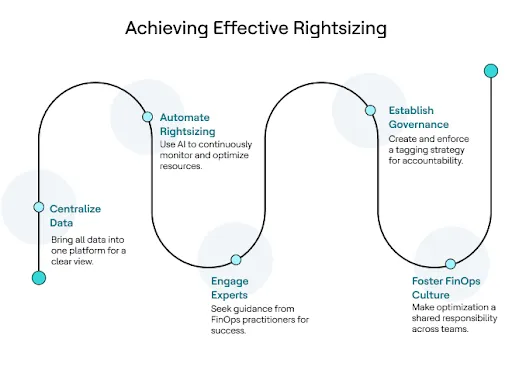
Image 2: Process to achieve effective rightsizing
|
Phase |
Activity |
Responsible Role |
Tools/Platforms |
Key Questions |
|
Phase 1: Visibility & Baseline |
Aggregate all cloud billing data. |
FinOps Team |
FinOps Platform (e.g., HCL MyXalytics), Cloud Provider Reports (AWS CUR, Azure Cost Management) |
What's our total spend? Where is the money going? Is our tagging strategy consistent? |
|
Phase 2: Analysis + Recommendations |
Identify underutilized resources and rightsizing opportunities. |
FinOps Team, Engineers |
FinOps Platform with AI, Native Cloud Tools (e.g., AWS Compute Optimizer) |
Which VMs are over-provisioned? Can we use a smaller instance type without impacting performance? |
|
Phase 3: Action + Automation |
Implement rightsizing changes and schedule non-production shutdowns. |
Engineers, FinOps Team |
FinOps Platform, Cloud APIs, Infrastructure as Code (IaC) tools (e.g., Terraform) |
Can we automate this process? How can we prevent this from happening again? |
|
Phase 4: Monitor + Optimize |
Continuously monitor rightsized resources to ensure performance goals are met |
FinOps Team, Application Owners |
FinOps Platform with real-time monitoring and alerting |
Are our applications performing well? Is the new instance size working as expected? |
Table 2: Phase-wise action plan for rightsizing
Conclusion: Moving Beyond Native Tools
AWS, Azure, and GCP each give you solid rightsizing tools. But if you’re trying to manage them separately, you’ll hit walls: inefficiency, delays, and missed savings.
The future is clear: AI-powered FinOps platforms that let you:
- See everything in one place,
- Automate rightsizing actions, and
- Get expert guidance on balancing performance and cost.
A single platform enables organizations to plan for future costs, optimize costs, and achieve business objectives as the organization grows, ensuring sustainable cloud computing practices.
Rightsizing isn’t just about cutting costs — it’s about building a sustainable cloud strategy that grows with your business.
That’s exactly where HCL MyXalytics makes a difference. It’s not just analytics; it’s a FinOps solution powered by AI and experts. With HCL MyXalytics, you get unified visibility, automated rightsizing, and real guidance from certified practitioners.
Get your free trial today.

Start a Conversation with Us
We’re here to help you find the right solutions and support you in achieving your business goals.