



Experience HCL ZIE for Web Client v16.0.1 as a Progressive Web Apps (PWA)

A Progressive Web App (PWA) is a web application built using standard web technologies such as HTML, CSS, and JavaScript, enhanced with modern web APIs to deliver a native-like user experience.
ZIE for Web Client v16.0.1 is implemented as a Progressive Web App (PWA), providing a fast, reliable, and responsive experience across supported platforms. PWAs combine the accessibility of web applications with key capabilities of native apps, enabling users to leverage rich functionality without the need for traditional app store installations.
As a PWA, ZIE for Web Client v16.0.1 can be installed on a device and works efficiently with a smooth user interface. Although it runs within a browser environment, it provides a seamless, application-like experience.
The browser ensures secure execution, fast loading, and automatic updates, while the operating system supports installation, presents the app similarly to a native application, manages performance and storage, and enables system notifications. Together, these components help keep ZIE for Web Client v16.0.1 fast, secure, and easy to use across supported devices.
Installing ZIE for Web Client as a Progressive Web App:
1. Open the ZIE for Web Client v16.0.1 in a modern browser that supports Progressive Web Apps (PWA).
2. Once the application loads, the Install option will appear in the browser menu or address bar.
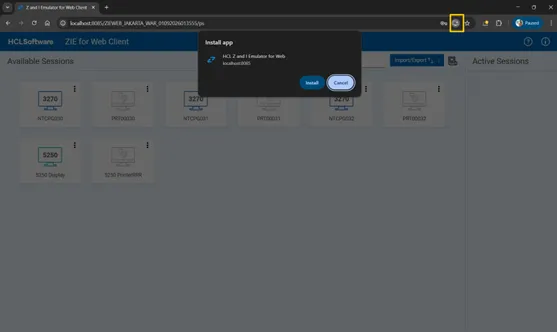
3. Select the Install or Add to Home Screen.
4. The application icon will be added to your desktop or mobile device, similar to a native application.
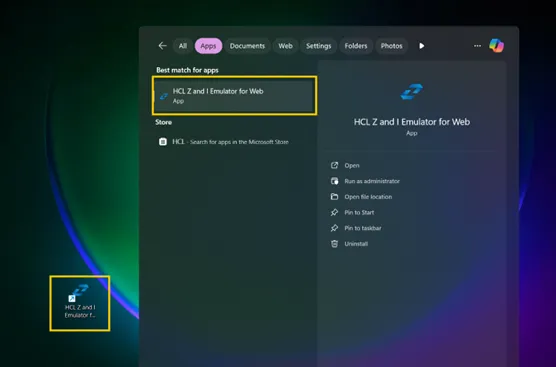
5. Click HCL Z and I Emulator for Web to launch the application in its own window.
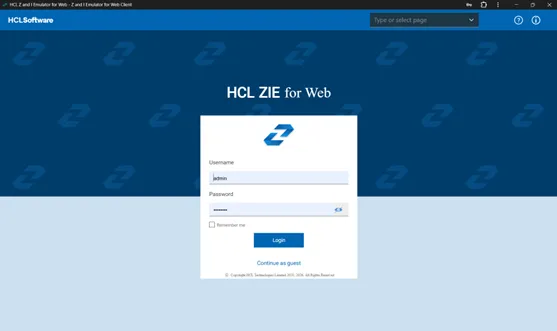
Note: No app store download is required.
URL Input Field in ZIE for Web Client v16.0.1
ZIE for Web Client v16.0.1 includes a convenient option called the URL Input Field in its Progressive Web App interface. This feature allows users to quickly access different pages within the application without switching to an external browser. ZIE for Web Client v16.0.1 provides a convenient URL Input Field within its Progressive Web App interface. This feature enables users to quickly navigate to different pages within the application without needing to switch to an external browser.
To access a page in the ZIE for Web Client v16.0.1 PWA:
- Open the installed PWA application.
- Locate the URL Input Field at the top of the interface.
- Enter the name of the page you want to open.
- Press Enter or click Go.
The selected page loads immediately within the same application window.
Additionally, the page is saved in local storage and will appear in the input field’s dropdown list for quick access in future sessions.
Whenever the PWA application is relaunched, the most recently visited page is displayed by default.
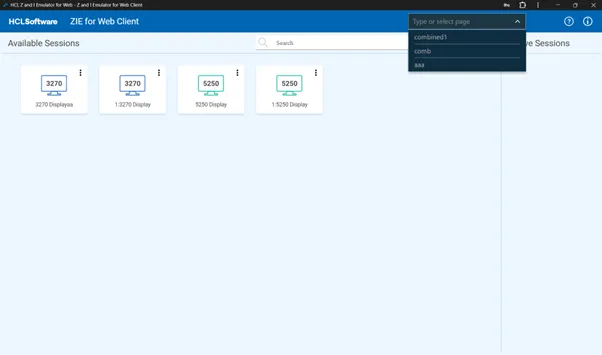
Advantages of the URL Input Field:
- Quick Access: Open any page directly in the app.
- Simple Navigation: Type the page name—no extra clicks needed.
- Smooth Experience: Pages load within the app, keeping it seamless.
- Time-Saving: Access pages faster and work more efficiently.
The PWA features in ZIE for Web Client v16.0.1, including the URL Input Field, give users a fast, reliable, and smooth experience. Users can install the app, navigate easily, work offline, and access pages quickly—all within the same app. These features make ZIE for Web Client v16.0.1 a simple, efficient, and user-friendly tool without needing app store downloads or browser navigation.

Start a Conversation with Us
We’re here to help you find the right solutions and support you in achieving your business goals.


